Basewallet
1 December, 2024
One app for money, mobility, and lifestyle
Africans want premium experiences, but the path is fragmented. Travelling with cash is stressful and unsafe, and even when you try to go digital, FX, trust, and access don’t always line up.
Fintech
Design Systems
Mobile App Design
Basewallet brings the essentials into one place: a multi-currency wallet and cards, travel-ready services, and lifestyle access, without requiring users to learn a “new way” to manage money.


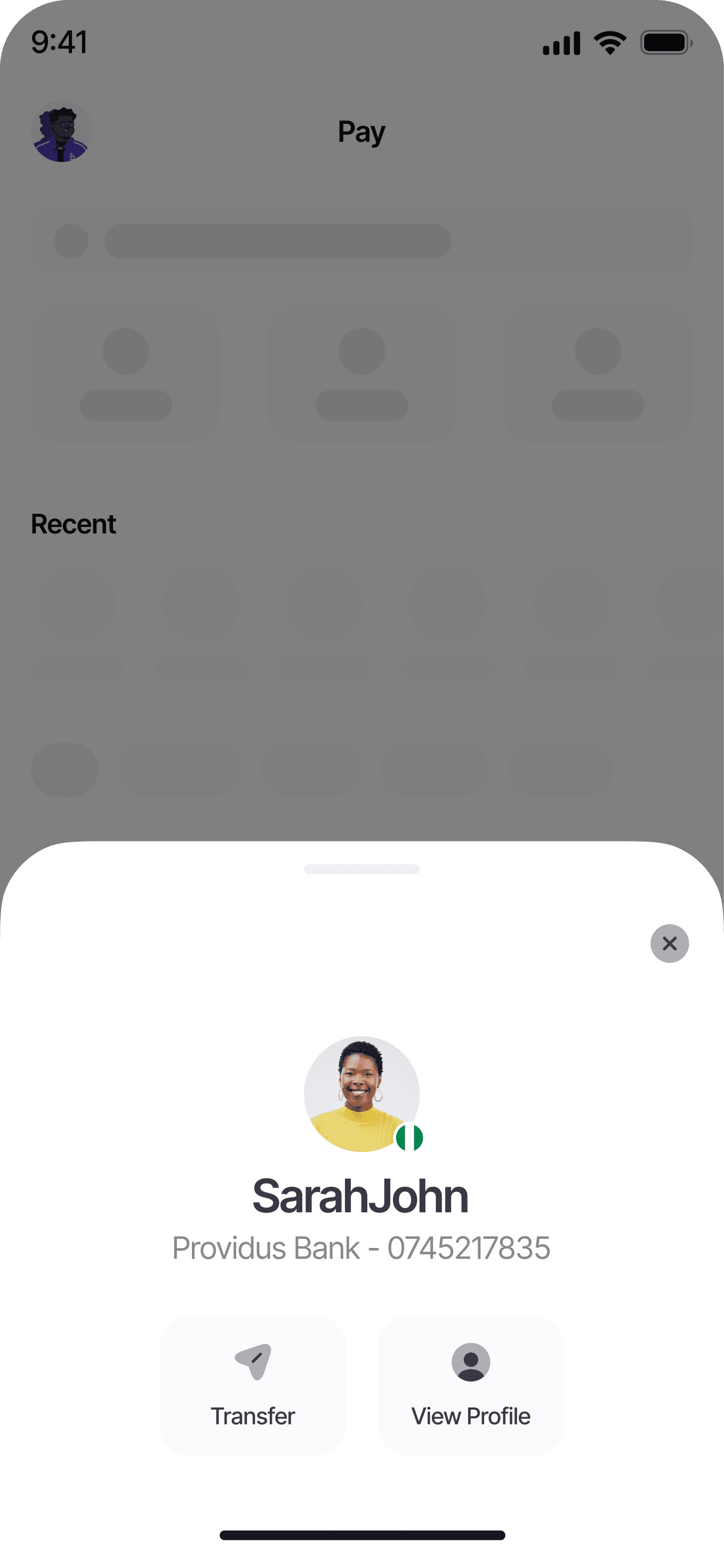


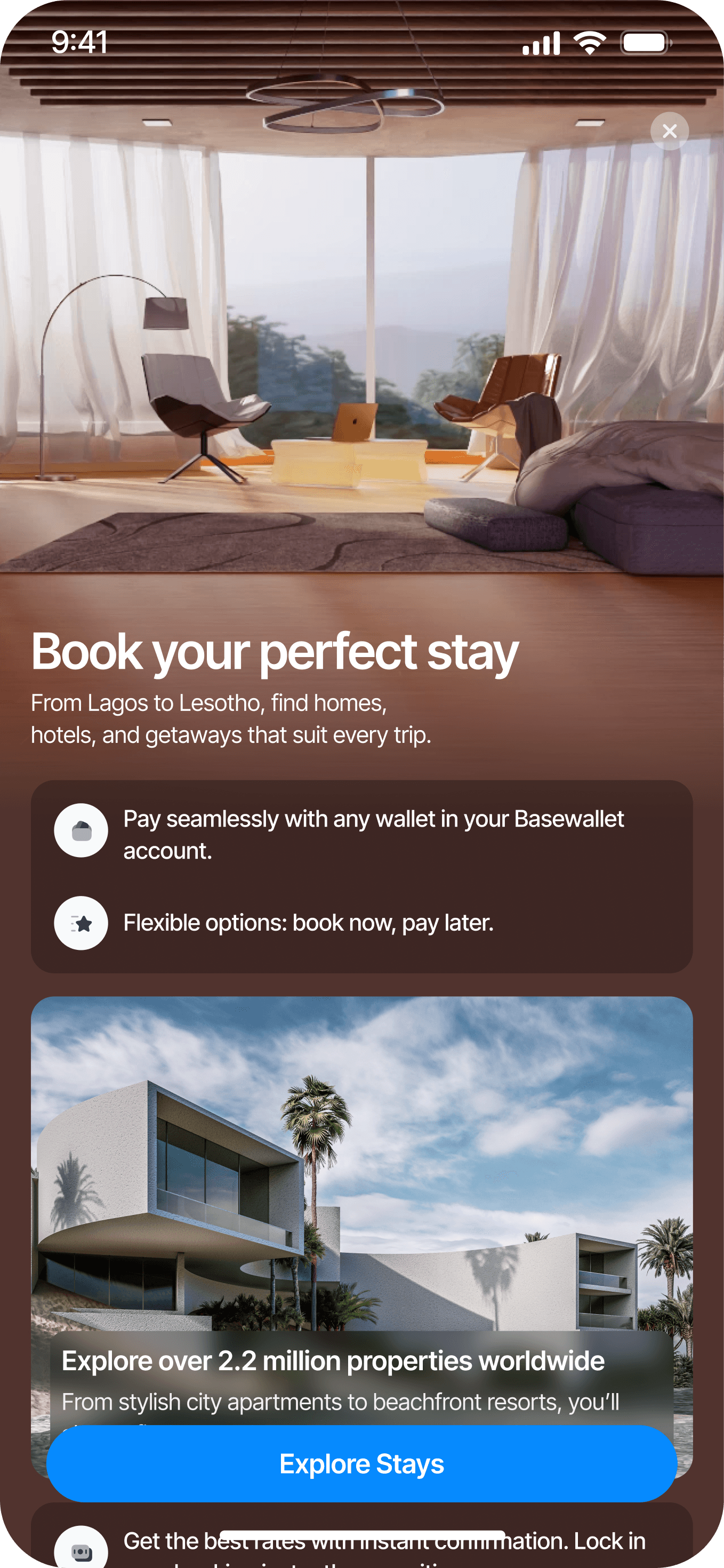


Key screens from across the product, showing how the different features come together
A bit of context
Basewallet started right after Apex proved traction. The team had the signal we needed to build something bigger than a single feature set, and the job became: take what worked in Apex and shape a product that could stand on its own.
Early on, Basewallet had a web app, but it wasn’t sustainable. Apex was funding the build, and maintaining web + mobile would’ve been expensive for the wrong reasons, so we went mobile only and designed it to feel properly native from the ground up.
My role
I worked on Basewallet in the same role as Apex, partnering closely with the CTO, my Design team and mobile engineering. I owned the UX and UI direction across the core wallet foundation, payment flows, and the experience of expanding into lifestyle features without losing simplicity.
Why I’m writing this
This case study isn’t a screen dump. It’s a walkthrough of the decisions that kept Basewallet coherent as it grew: how we built a strong financial foundation, made pay flows feel consistent across rails, and introduced Hub features without hijacking the wallet.
What makes Basewallet, Basewallet
A bit of context
The journey of building Basewallet made one thing obvious: a lot of global products miss African realities. FX, mobility, and trust aren’t separate problems here — they’re intertwined. And when lifestyle services are available, they’re often scattered across tools that don’t talk to each other, with opaque steps that make users second-guess every tap.
So Basewallet is built around a simple, seamless flow with three guiding pillars:
Fund & Provision: Give users a solid base: hold money across currencies, fund easily, and spend without friction.
Travel & Access: Reduce the stress around movement. If someone’s travelling, the product should help them feel prepared, not like they’re juggling five apps and screenshots.
Manage & Scale: Make the “adulting” part feel lighter by organising payments, tracking activity, and managing lifestyle spend with clarity.
Product thesis
Basewallet’s thesis is simple: one app for money, mobility, and lifestyle. Not a bunch of disconnected features in tabs, but a coherent system where funding, spending, travel access, and lifestyle needs live in one place, with trust and habit formation guiding the design.
That’s the bar: premium experiences, made feel straightforward.
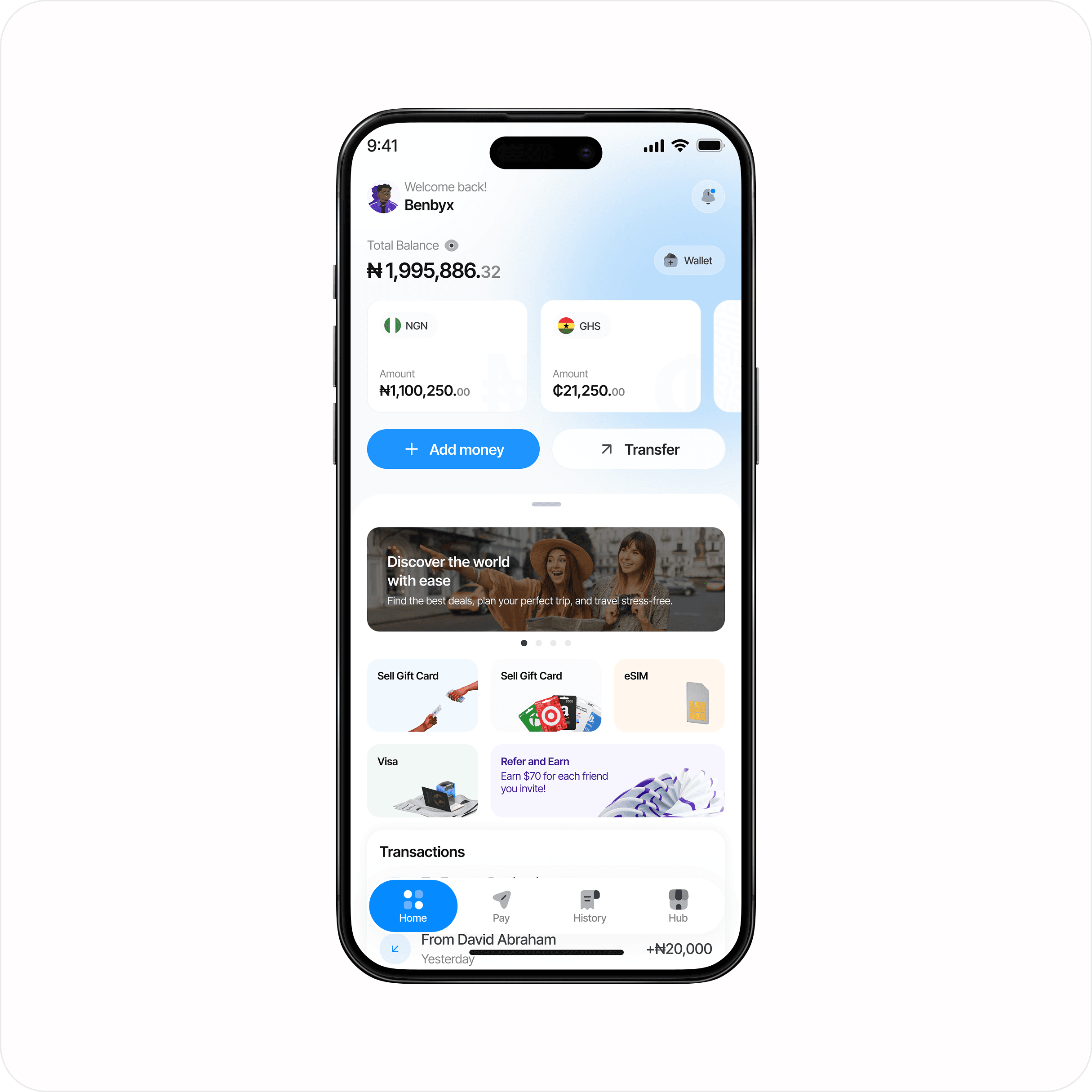
The Home page
Clarity
Money products don’t get many second chances. If the first screen feels confusing, people assume the rest of the experience will be risky.
So we treated Basewallet like a calm money home screen. The fundamentals sit up front: total balance, wallets, and the actions users reach for most. Everything else is still there, but it doesn’t shout.
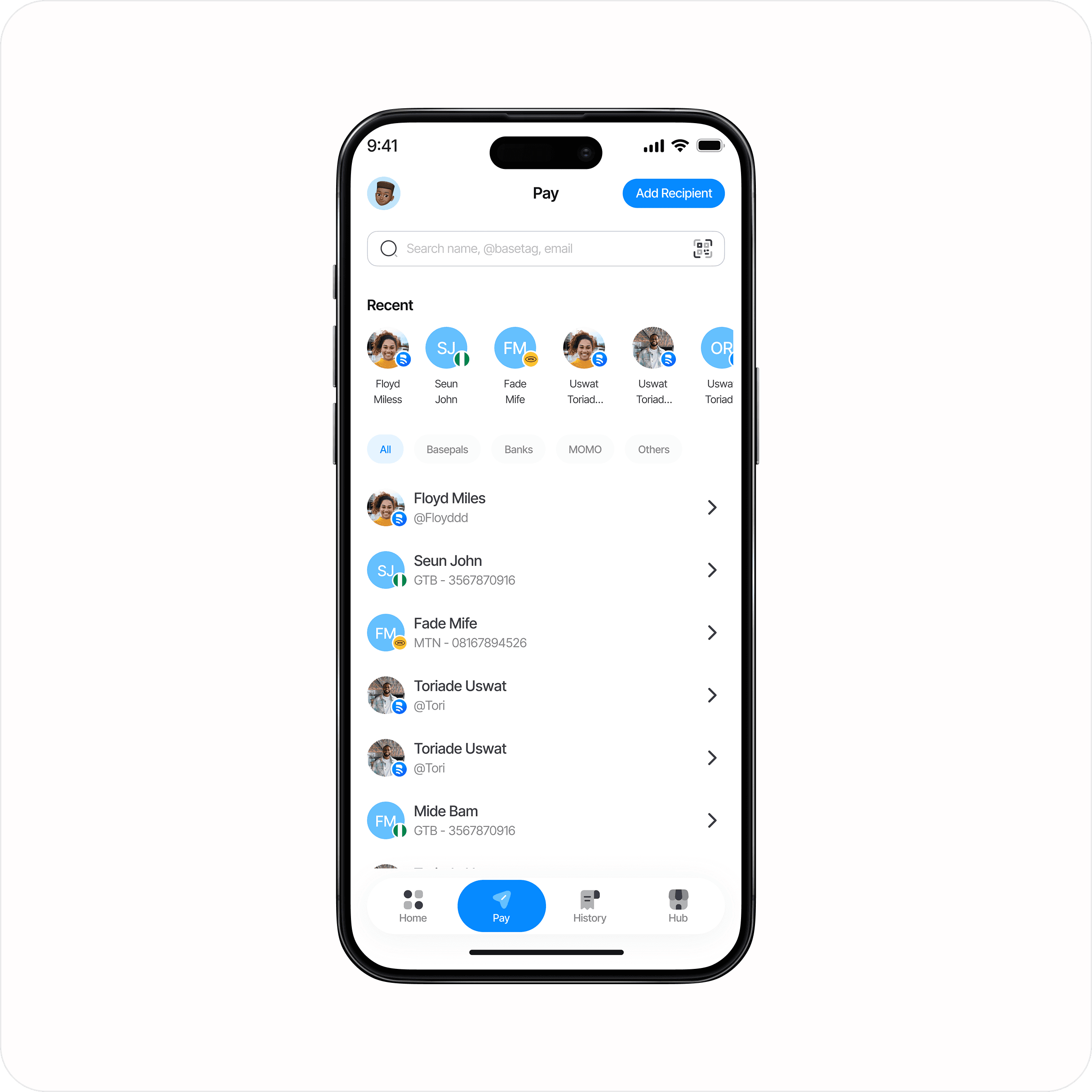
Pay screen showing different rails and recent recipients in one place.
Trust
With money, trust isn’t a feature. It’s the feeling users get in the in-between moments: right before they send, while something is processing, and when they need proof that it worked.
That’s why we designed trust as a flow, not a single “security page”. Clear confirmations, calm processing states, and receipts that answer “what just happened?” reduce second-guessing.

Transfers feel predictable because the product is always saying the right thing at the right time.
Expansion without clutter
Basewallet isn’t only for moving money. People also want everyday services, bills, gift cards, travel, and vouchers close to where their balance already lives.
But adding services usually adds clutter. We avoided that by keeping the wallet as the centre, and treating the Hub as a layer you dip into when it’s relevant.
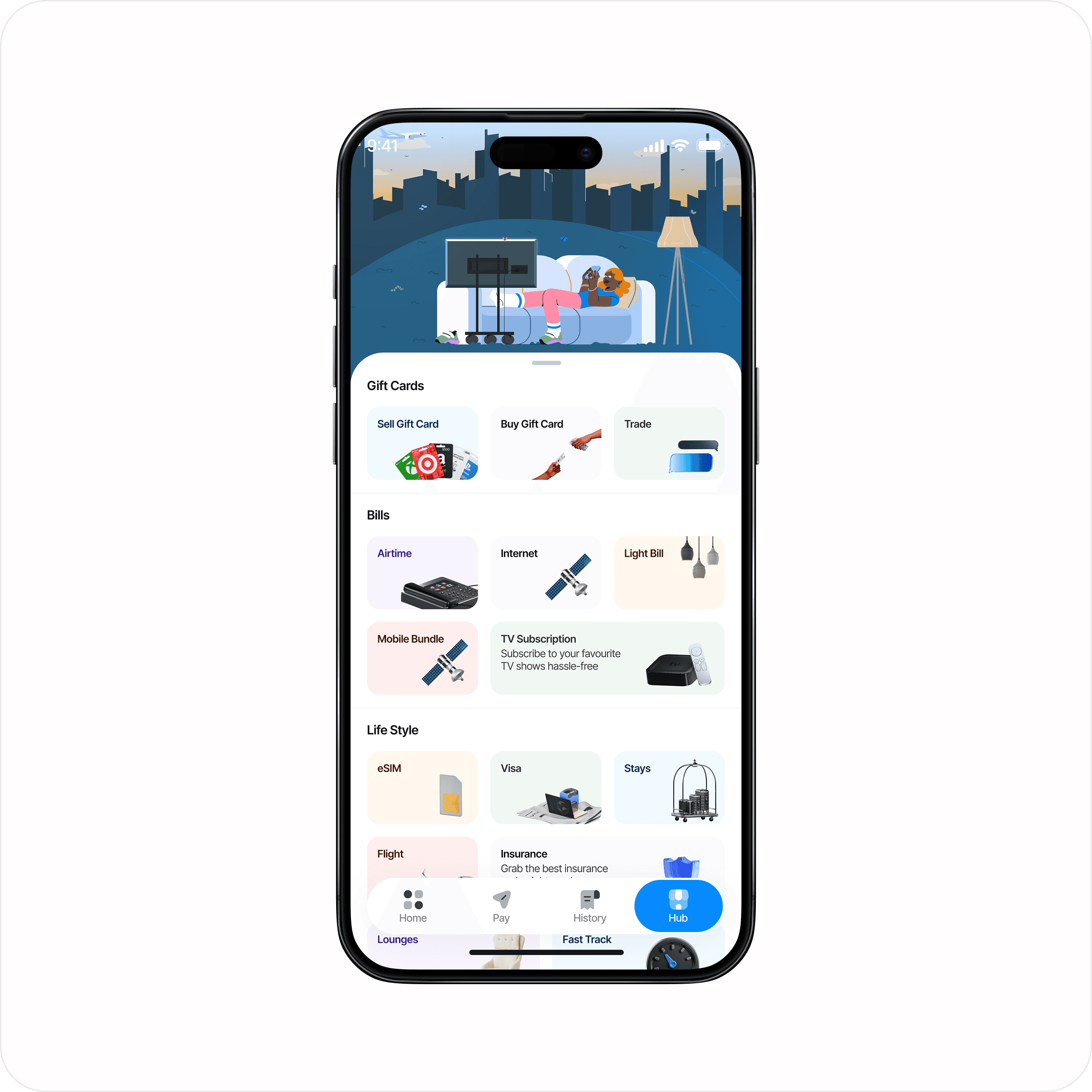
The Hub expands what you can do, without turning the core wallet into a feature list.
Our bet with Basewallet
The bet was simple: if the wallet stays calm and predictable, users will trust it as the default place for their money. And once that trust is earned, adding lifestyle services feels like a natural extension rather than a distraction.
Money foundation (Home + Wallets)
The challenge
Before Pay, before Hub, before vouchers and travel add-ons, the wallet had to earn trust in the boring moments.
Users needed to answer three questions quickly:
What do I have?
Where is it held?
What can I do with it right now?
If any of those felt unclear, everything else would feel risky.
Designing the Home — one place for everything you can do
Home is the anchor. It’s where we set the tone: calm, readable, no drama.
We kept the hierarchy tight. Total balance first, wallets right after, then two clear actions. Anything “extra” (Hub, promos, recommendations) stays lower in the page so it doesn’t compete with the basics.
(We already showed the Home hero above, so I’m not repeating it here.)
Multi-currency wallets
Because users hold value across currencies, wallets needed to feel like first-class objects, not a hidden settings thing.
We treated “create wallet” as a natural step rather than a commitment. It’s quick, obvious, and it doesn’t punish you if you’re just exploring.

Adding a wallet feels lightweight, so users don’t overthink it.
Single wallet
Once a user is inside a wallet, the job is to make actions feel close and context-aware.
Transfer and convert sit-ups to the top because they’re the most common next steps. Details and transactions are both one tap away, because people bounce between “I need proof” and “I need to do something” constantly.

One wallet view that balances action, clarity, and proof.
Deposits
Deposits are one of those moments where people get anxious. They want accurate details, to copy quickly, and to share without messing anything up.
So the pattern is consistent: show the account information clearly, make copy/share obvious, and avoid burying important context behind secondary screens.
How the foundation supports everything else
Once Home and Wallets feel predictable, Pay becomes simpler (it’s just moving value), and the Hub becomes less distracting (it’s optional).
That foundation is what lets Basewallet expand into lifestyle features without losing the feeling that it’s still, at heart, a wallet you can trust.
Pay (Basepals, Bank, MOMO, QR)
One entry point, multiple rails
A wallet can support loads of payment rails and still feel simple, but only if users don’t have to relearn the product every time they send money.
So I treated Pay as a single surface: one place to decide who you’re paying, then choose the rail that fits (Basepals, bank, MOMO, or QR). The goal was to make it feel like a single action with a few routes, not four separate features.

Pay screen showing different rails and recent recipients in one place.
Pay entry
Pay starts with what people do naturally: search or pick someone they’ve paid before. Recents carry a lot of weight here because most payments are repeats, and repeat flows should feel almost effortless.
The rails sit close, but they don’t compete. The hierarchy is designed so users can start fast, then get more specific only when they need to.
Basepals
Basepals is the quickest option when you’re paying someone who's already in Basewallet. The experience should feel immediate and friendly, without losing the seriousness of moving money.
I leaned into a simple “pick person → amount → confirm” rhythm, and kept the chat style layer as context rather than noise.
Bank transfers
Bank transfers are where anxiety spikes. People care about details, speed, and proof.
So even though the rail is different, the experience stays familiar: pick the recipient, confirm the important bits, then clear status language that tells you what’s happening.
MOMO
MOMO needed the same familiarity as bank transfers, even if the underlying rail behaves differently.
The design goal wasn’t to hide the difference; it was to keep the mental model stable. When users switch rails, the product should still feel like Basewallet.
QR payments
QR codes are for moments when typing is friction. It’s also where mistakes can happen fast, so clarity matters.
I split QR into two clear modes:
Scan to pay when you’re paying a merchant
Show my QR when you want to get paid

QR payments showing scan, amount, and a clear success state.
Keeping Pay coherent
Across Basepals, bank, MOMO, and QR, the main job was consistency:
the same tone of confirmation
predictable processing states
receipts that make the result obvious
That consistency is what makes Pay feel like one feature, even when the rails underneath are different.
Hub
A marketplace that doesn’t feel like an app drawer
Hub is Basewallet’s expansion surface, the place where “money” becomes “mobility and lifestyle”.
Instead of forcing people to bounce between separate providers and payment methods, Hub gives a single access layer for the parts of travel that usually feel chaotic: finding flights, sorting stays, getting lounge access, handling fast track, and even visa workflows.
The point isn’t to become everything overnight. It’s to make the path feel unfragmented, especially for travellers who need clarity, trust, and predictable outcomes.

Hub screen grouping services by intent, not a random feature list.
Why Hub exists
People already use their wallets as a base for daily life. Airtime, internet, bills, gift cards, travel, even small services like eSIMs or visa support these things are more useful when they’re close to where your balance already lives.
But we avoided pushing Hub content too aggressively. If a user came for “send money”, the product shouldn’t drag them into a marketplace.
The structure
Instead of organising by internal teams or feature types, the Hub is structured around intent. It’s designed so users can scan quickly and still feel like they’re in the same product.
I kept the layout consistent and avoided overly clever naming. The Hub should feel obvious, not like something you need to learn.
Lifestyle
Lifestyle is where Basewallet becomes more than “send and receive”. It’s also where things can get messy fast. So the goal here is range and coherence: show that Basewallet can handle travel and services while keeping every entry feeling like it belongs in the same app.
Lifestyle in Basewallet isn’t “extras”. It’s access, the stuff people usually struggle to plan, pay for, or trust, pulled into the same flow as their wallet.

Lifestyle brings travel and services closer to where your balance already lives.
Flights
Flights is built around a simple pattern: search, filter, compare options, then book. The design goal was to keep results scannable and the booking steps predictable, so users don’t feel like they’ve been dumped into a totally different product.
Flight booking starts with clear search and scannable results.
Stays
Stays covers hotels and suites. Users browse, filter, review details, and book accommodation. The key is clarity on what you’re getting (price, dates, room type, cancellation rules) without making the flow feel heavy.
Stays is designed for confident selection: details that matter, without clutter.
Airport Lounges
Lounges is about comfort and calm while waiting to fly. It’s a different job from booking accommodation. The design focus is quick reassurance: what’s included, how access works, and where the lounge is in the airport.
Lounges focuses on benefits and access, not endless browsing.
Visa
Visa is for applying for travel visas by country and visa type. The product job is to make requirements feel manageable: clear steps, clear document expectations, and obvious progress so users don’t get stuck or abandon halfway.
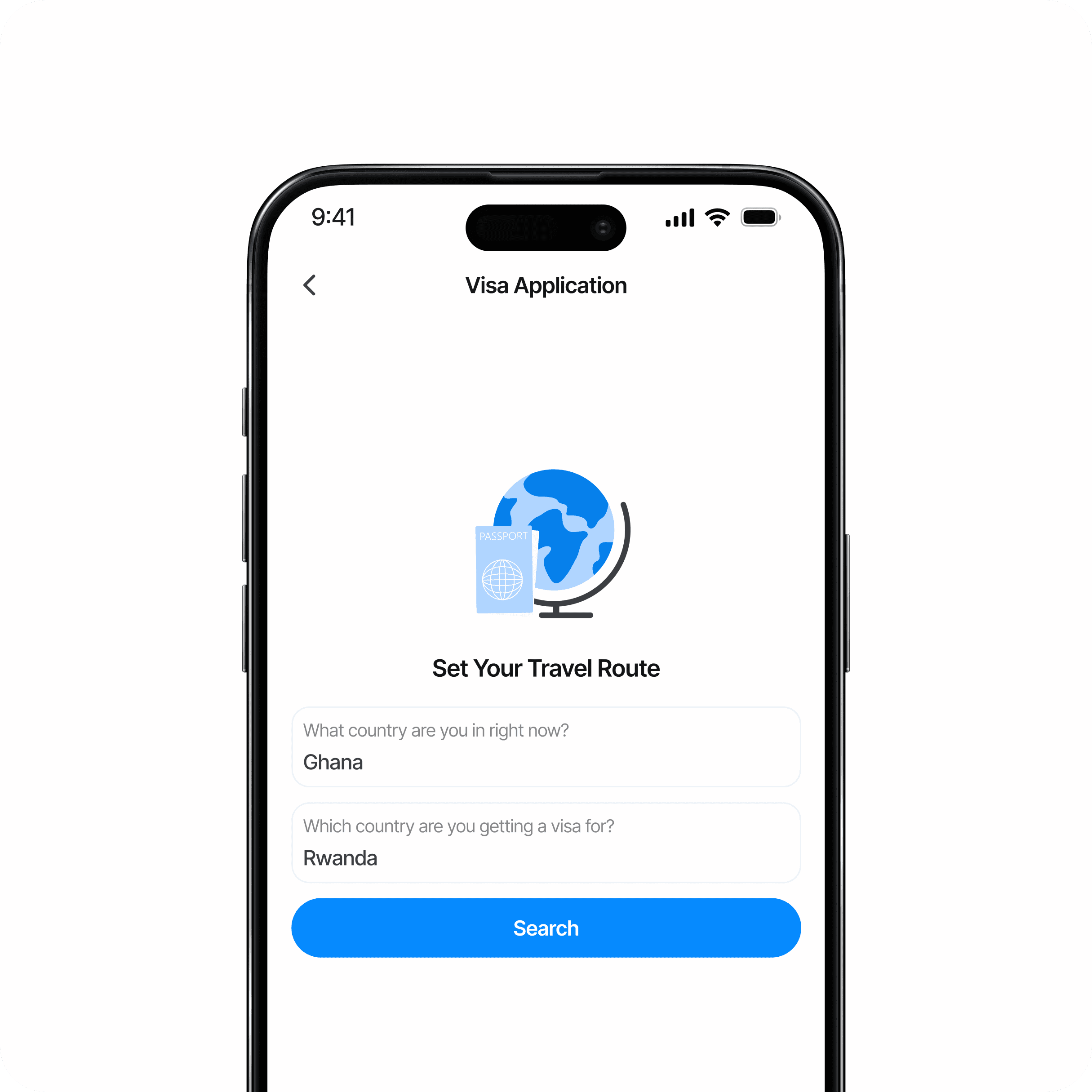
Visa turns a complicated process into a guided checklist.
eSIM
eSIM lets users stay connected the moment they land. Instead of hunting for local SIM cards or paying exorbitant roaming fees, they can browse, purchase, and activate mobile data directly in Basewallet.
The design goal was simple: remove travel friction. Make plans easy to compare, surface what actually matters (coverage, validity, data limits), and reduce activation to a few confident steps. No jargon. No telecom confusion. Just tap, install, connect.
Buy. Install. Connect. Travel data made simple.
Fast Track
Fast Track is about one thing: getting ahead of the queue and buying back time. Instead of waiting in long security lines, users can move through more quickly and relax before boarding. It’s a clear value exchange that fits naturally alongside flights and lounges.

Fast Track sits alongside travel features as a time saving upgrade.
Vouchers
Make gifting feel intentional, not like a checkout puzzle
Vouchers sound simple on paper, but they can become confusing quickly: what exactly am I buying, who is it for, how do they redeem it, and how do I know it worked?
So the goal with vouchers was clarity. The user should always understand three things:
What the voucher is for
Who will receive it
What happens after purchase

Voucher homepage showing categories and recommendations.
Discovery
The homepage is designed to make vouchers feel browsable rather than transactional. Instead of throwing people straight into a form, it gives them a quick way to scan options, find what’s relevant, and understand the type of value they’re gifting.
Purchase
The voucher flow keeps the essentials up front: value, recipient, delivery method, and a clear confirmation before payment. We avoided burying important details in tiny text. If something changes how the voucher works (expiry, redemption rules, restrictions), it should be visible before the user commits.
Delivery
Delivery is where vouchers either feel delightful or frustrating. So we treated delivery like part of the product, not an afterthought. Users should be able to send a voucher cleanly, and the recipient should understand what it is, even if they’ve never used Basewallet before.
Voucher delivery is designed to feel clear and shareable.
After purchase
After purchase, users need proof and control:
A record in history
A clear status (sent / delivered / redeemed if available)
An easy way to resend or share
That’s what makes vouchers feel trustworthy, not just convenient.
History & Transparency
Trust is built in receipts, statuses, and the “what just happened?” moments
In money apps, history isn’t a nice-to-have. It’s how people reassure themselves that something worked, prove it to someone else, and recover when something goes wrong.
So the goal wasn’t just “show transactions”. The goal was to make every money action leave a clear trace — with labels, details, and states that reduce second-guessing.

History makes activity easy to scan, without hiding what matters.
Activity feed
The history feed is designed for quick scanning. People usually come here with a question, not curiosity:
Did it go through?
Who did I send it to?
What wallet did it come from?
So entries need clear titles, familiar categories, and amounts that are easy to read at a glance.
Transaction details
When users tap into a transaction, they’re looking for proof. Details should answer the practical questions: reference, date/time, status, recipient, fees (if any), and which wallet was used. It’s also where we make it easy to share or copy information when a user needs to show proof of payment.

Transaction details are designed like a receipt: clear, complete, and shareable.
Status, filters, and support
Status wording is a design decision. “Pending” and “processing” can create anxiety if they feel vague, so we aimed for simple, consistent language across rails (Basepals, bank, MOMO, QR) and kept the same rhythm users already see in Pay: confirm, process, complete.
As the product surface area expands, history must scale accordingly. Filters (by status, type, wallet, and date) and search tools help users find what they need without endless scrolling, even on busy accounts. “Finding proof” should still feel straightforward. Since history often reveals where issues arise, it also requires a clear route to support when something appears wrong, without pushing users to contact support unnecessarily.
Settings, Security & Control
Give users control without turning safety into friction
Settings can easily become a graveyard. Lots of options, not much clarity. So the job here was simple: keep controls discoverable and reassuring, without making users feel like they need to “configure” Basewallet before it’s safe to use.
Control
Users should be able to manage the basics quickly: profile details, preferences, and anything that affects how they receive information.
Where possible, controls are grouped by intent (account, security, notifications) so people don’t have to guess where something lives.
Security
Security is only useful if it’s understandable. The focus is on predictable access patterns (passcode/biometrics), clear verification moments when needed, and settings that help users recognise unusual activity.

Security settings are designed to feel clear and trustworthy, not intimidating.
Transparency
Settings is also a place for reassurance: legal, privacy, and account options should be easy to find when users go looking for them. The goal is to reduce uncertainty. If someone wants to understand how the product works or what their options are, the answers shouldn’t feel hidden.
Impact & Learnings
What changed after shipping, and what I’d do differently next time
Basewallet’s scope is intentionally broad, but the work was anchored around a few core outcomes: a wallet foundation that feels stable, Pay flows that feel consistent across rails, and a Hub that expands capability without stealing focus.
Read Case Studies

