Apex — one place for money that lives in many places
12 January, 2024
Apex is a cross‑platform money app for people who live across borders. We designed it to make crypto exchange and gift card trading feel reliable and straightforward, while letting people use any asset in their wallet, cash or crypto, to fund everyday payments, virtual cards, and more, on both mobile and web.
Crypto
Design Systems
Multi-Product Ecosystem
A bit of context
I’ve been working on Apex for the past few years, initially as the first product designer and later as the design lead, mentoring two junior designers as the product scaled.
During that time, Apex evolved from a narrow web product into a multi‑asset money hub with:
Full crypto flows (deposit, withdraw, buy, sell, swap)
Deeply integrated gift card exchange (buy & sell using any asset)
Virtual dollar cards for online payments
Support for bills and top‑ups as an on‑ramp for non‑crypto users
More advanced features like scheduled payments, limit orders, and the first version of Apex Pay for businesses
Since launch, Apex has grown from a few hundred early users to 150K+ downloads, with usage across Nigeria, the US, and other markets, and a steady increase in how often people come back to use it.


Why I’m writing this
This isn’t a technical breakdown of every edge case or growth tactic.
It’s an attempt to document the essence of Apex: how we tried to make a messy, multi‑rail money product, spanning crypto, cash, gift cards, virtual cards, and everyday payments, feel calm, trustworthy, and usable for both first‑time and power users.
It’s about how we took something that could easily feel like five different apps (exchange, wallet, gift cards, cards, bills) and made it feel like one place.
What makes Apex, Apex
Before I joined, Apex existed as a web experience focused mainly on crypto deposits/withdrawals and gift card trading (buy & sell). There was no functional mobile app and no unified way to see or move value across cash, crypto, cards, and other everyday money use cases.
Version 3 was our opportunity to turn Apex from a narrow web tool into a full money app across mobile and web, with crypto and gift cards at the core.
The context
A lot of the people we’re building for don’t have one way they use money.
They’re:
Getting paid in cash or bank transfers
Holding or trading crypto
Buying and selling gift cards to move value across borders
Using virtual dollar cards for subscriptions and online shopping
Paying bills, airtime, data, and bets from different apps
For many of them, this isn’t experimentation. It’s just the reality of living, working, and sending money across countries, often with no single source of truth for “how much I really have, and where”.
The problem
Before Apex v3, that reality looked like this:
Four or five different apps to move value between cash, crypto, cards, and gift cards
Risky P2P trades in chats and social groups, with no real protection
Scattered balances across wallets and platforms, making it hard to know “what I really have”
Apps that were either too complex for beginners, or too shallow for power users
No consistent way to switch between mobile and web and still feel at home
People were doing complex value movement, swapping assets, routing through gift cards, juggling banks and cards, with tools that weren’t designed to support that behaviour.
Our bet with Apex
With Apex, we made a simple bet:
If we can make crypto exchange and gift card trading feel safe and straightforward, and let people use any asset in their wallet, cash or crypto, to power everything else (bills, virtual cards, payments), they’ll be more willing to do all of it in one place.
That shaped almost every design decision:
A single balance you can trust at a glance, even across multiple wallets
One mental model for wallets across fiat and crypto
Clear, guided flows for buying and selling gift cards with any asset, instead of improvised P2P
Flows that let users pay or fund things directly from any supported asset, not just “the main” balance
A layout that works for both quick checks and deep, multi‑step tasks
The same core ideas expressed across mobile and web, so users feel at home on both

One place to see everything you own, across cash, crypto, virtual cards, bills, and gift card exchanges.
My Role & The Team
I was hired to design Apex v3. Before I joined, Apex existed mainly as a web experience focused on two things:
Crypto – deposit and withdraw
Gift cards – buy and sell
There was no real mobile app, and Apex wasn’t yet the “all‑in‑one money hub” it is today.
For v3, the goal shifted. We wanted Apex to become a cross‑platform money app where people could manage cash, crypto, virtual cards, bills, and gift card exchanges in one place, on both mobile and web.
I joined as the first product designer, responsible for:
Designing the mobile app from scratch
Redesigning and extending the web app beyond just crypto and gift cards
Defining the information architecture across platforms
Establishing the initial visual language and component patterns
My role in building Apex
I worked directly with Efemena Abraham (CEO) to translate his vision for v3 into a concrete product strategy and interface. Together, we aligned on:
What v3 needed to include at launch
How to balance complexity vs. clarity for users with very different levels of financial and crypto literacy
How Apex should feel as a product, not just what it should do
As the product evolved, my role shifted from solo designer to a design lead. I:
Mentored two junior designers
Set up a shared design system across mobile and web
Collaborated with the marketing team on our go‑to‑market and user acquisition strategy
Partnered with engineering to ensure that new features, like cryptocurrency trading, gift card exchange, and the virtual dollar card, were technically feasible and shipped with the right level of polish
Through this cross‑functional work between design, marketing, engineering, and leadership, we were able to grow Apex from a narrow v2 into a much broader v3 product with meaningful adoption and engagement.
Product at a glance (Mobile + Web)
Apex v3 is available on both mobile and the web.
Most people start on mobile for day‑to‑day tasks, then move to the web when they want a bigger, more detailed view of their money.
We designed the two platforms to share the same mental model, but not the same layout.
People switch between mobile and web depending on what they’re doing. Mobile is where quick checks and quick actions happen. The web is where longer sessions, deeper management, and bigger decisions happen.
So the structure, language, and core patterns stay familiar across both, but each platform is optimised for the behaviour it supports: speed on mobile, overview and control on web.
Mobile – your everyday money app
On mobile, Apex becomes the everyday money app: check your balance, move money between wallets, pay bills, manage cards, and trade gift cards from one place.
Wallets overview – showing multiple assets (cash + crypto)
Bills / services list – airtime, data, power, TV, betting
Gift card sell / trade flow – to hint at cross‑border value movement
The mobile app is designed around quick decisions: Deposit or withdraw into any wallet, Pay everyday bills in a few taps, Buy or sell gift cards without leaving the app
Most users don’t think in “features” — they think in tasks. The structure of the app follows that.
Web – your command centre

Crypto wallets grid – calm overview of multiple assets

Gift card catalog / sell view

Virtual Card – detailed activity view

Invoicing – built for how businesses actually operate, not how software assumes they do.

Transactions – Every transaction, every detail, right where you need it.
Trust & Security
Apex sits in a high‑risk space:
People are moving cash, crypto, and gift cards in and out of the platform.
Many transactions are cross‑border, with chargeback and fraud risk.
Users are already cautious because of past bad experiences with other apps.
If users don’t trust the app, it doesn’t matter how good the flows are; they won’t keep real balances inside Apex.
So the question for v3 was:
How do we make a powerful money app feel safe enough that people are willing to store real value in it?
The decision
Instead of scattering security controls across random settings screens, we centralised the most important protections into one place. The goal was simple: when users feel anxious, they shouldn’t have to hunt.
So we designed a single Login & Security hub, with the highest-trust actions surfaced first and explained clearly, especially in markets where scams, fake apps, and account takeovers are a real, everyday fear.
Login & Security hub (mobile)
On mobile, I pulled all critical protections into a single Login & Security hub.
From here, users can:
Change their password
Turn on passkeys / biometrics
Enable two‑factor authentication (2FA)
Review device history and trusted devices
Set an anti‑phishing code for official communication
See session recording and even delete their account
The most essential protections, 2FA, passkeys, and device history, are placed higher in the hierarchy, with clear labels so users know exactly what each option does.
All critical protections live in one place, with the most important surfaced first.
Device transparency & anti‑phishing
If your users are mainly in markets with a lot of scams and fake apps, “who has access to my account?” becomes a core trust question.
In the security hub, we focused on transparency:
Trusted devices → users can see which devices are logged in and revoke access.
Device history → a clean timeline of logins and sessions.
Anti‑phishing code → a simple user‑set code that appears in legit emails/notifications so they can quickly spot fakes.
We designed this to match real security anxiety we heard from users: ‘I don’t know where my account is logged in’ and ‘I can’t tell which messages are real
Security on the web
On the web, we mirrored the same structure so users don’t have to relearn where security lives.
The Login & Security section follows almost the same order as mobile.
Language and groupings are consistent across platforms, so turning on 2FA or changing a password feels familiar whether you’re on desktop or phone.
This is important for Apex because many users:
Sign up or top up on mobile
But do deeper management (bigger balances, longer sessions) on web
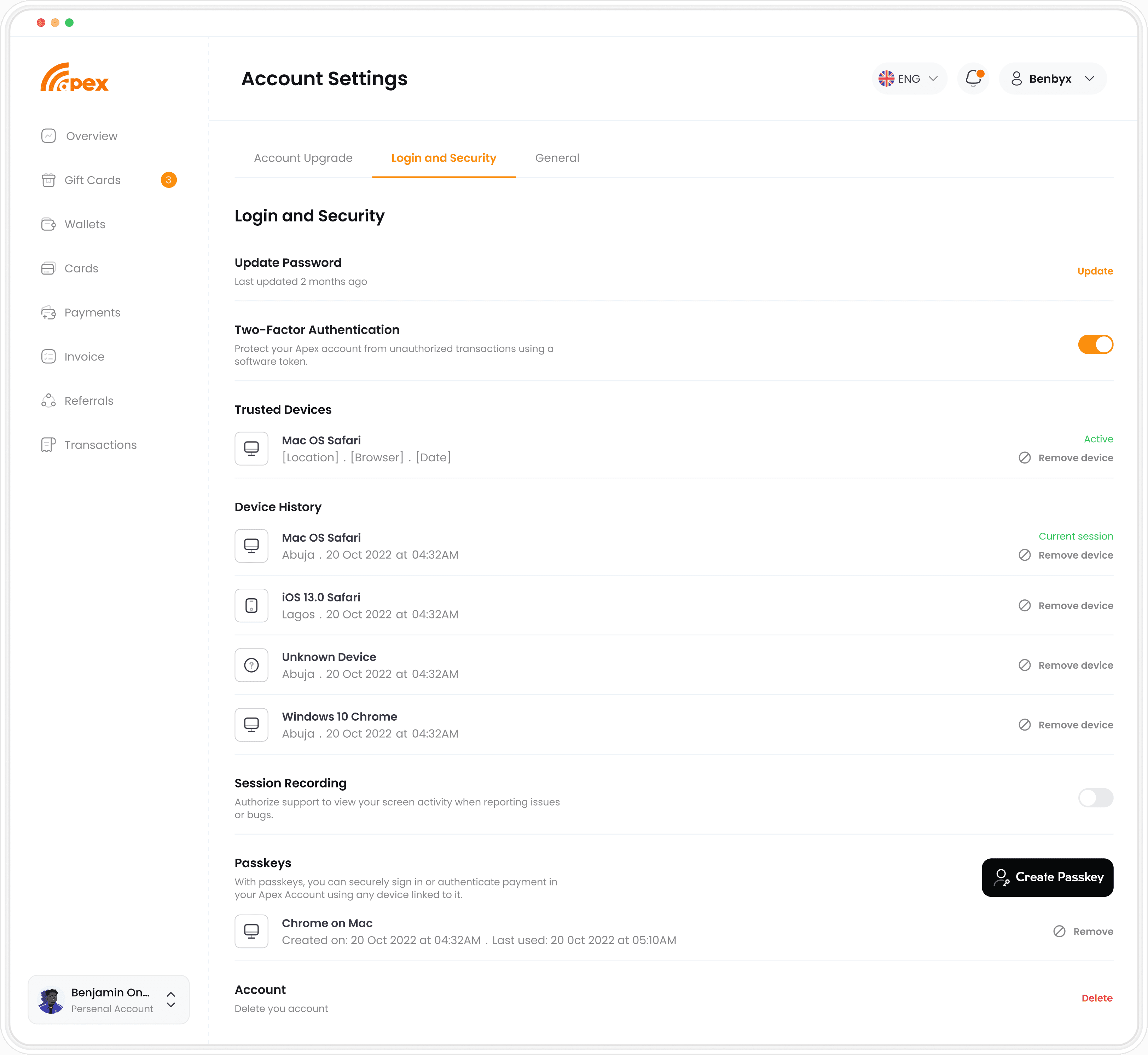
The same security model across web and mobile, so users always know where to find protection.
One Wallet, Many Rails
For most people using Apex, “money” isn’t just one thing.
It’s:
Cash / NGN / local bank transfers
Crypto balances across different assets
Virtual dollar cards for online payments
Gift cards they buy and sell to move value
Before v3, all of this lived in silos:
Crypto in one app
Gift cards in another
Bank transfers and bills somewhere else
Virtual cards, if they had them, in a separate product
The result: people constantly jumping between apps, taking screenshots of balances, and manually doing the mental math of “how much do I really have?”
For v3, we wanted Apex to feel like one wallet with many rails, not many separate products stitched together.
The principle
The wallet layer needed to answer one question fast: “What do I really have, and what can I do with it?”
So we made a deliberate choice: Apex should feel like one wallet with many rails, not many separate products stitched together.
The decision
We anchored the experience on a single, clear total balance (so users can trust what they’re seeing at a glance), then let them drill into separate rails only when they need more control (fiat, crypto, cards, gift cards).
That meant:
A single, clear total balance
Separate views for fiat, crypto, cards, and gift cards when needed
Quick access to core actions, deposit, withdraw, trade, send, without hunting through menus
A layout that feels calm for beginners but is still powerful for heavier users
Mobile — Home as the “money hub” On mobile, the home screen became the hub.
A large total asset card at the top shows what the user owns across rails.
Three primary actions, Deposit, Withdraw, Trade, sit directly on that card.
Just below, we surface the core services: wallets, virtual cards, gift cards, bills, bet top‑ups, and more.
Recent transactions live lower down, so you can scan activity without the screen feeling like a bank statement.
This lets most users complete 90% of what they came to do from a single screen, without bouncing between tabs.

The home screen acts as a hub: one total balance, three core actions, and quick access to every rail.
Mobile — Wallets that stay readable as they grow
As users add more assets, many apps respond by cramming more information into the same space.
For Apex, we went the other way.
Each asset sits in its own card, with a clear name, icon, and balance.
Fiat and crypto share a similar visual language, so users don’t have to “re-learn” how to read each asset type.
Tapping into any wallet lets users deposit, withdraw, or trade without leaving the context of that asset.
The goal was to make a multi‑asset wallet feel calm, even when it’s full.

A card‑based wallet layout that scales with more assets without becoming a table of numbers.
Mobile — Flows that respect context (Deposit / Withdraw / Trade)
Every action, deposit, withdraw, trade, hangs off the same mental model:
Pick what you want to move (which asset/wallet)
Pick how you want to move it (method/channel)
Confirm with a clear summary (amount, fees if any, destination)
Keeping the structure consistent across flows makes it easier for new users to trust what’s happening, even when they’re doing something for the first time.

Deposit, withdraw, and trade share the same structure, so users don’t have to relearn each flow.
Everyday Value Movement
Even though we support bills, airtime, and utilities, those were never the core of Apex.
They were intentional bridge features, a way to help non‑crypto users feel comfortable coming into the product and doing something familiar.
The real heart of Apex is:
Making crypto exchange feel simple and usable every day
Turning gift cards into a flexible way to move value
Giving people ways to spend and control that value (virtual cards, scheduled payments, limit orders)
So this chapter focuses on how people actually move money inside Apex, not just how they pay for things.
Crypto as the primary rail
Crypto is the backbone of Apex. But for most people, crypto is:
Intimidating
Full of jargon
Split across too many apps
For v3, we didn’t want “a crypto app for traders.” We wanted:
A money app where crypto is just one of the rails, and it feels usable even if you’re not ‘in crypto’.
What we designed
From the wallet and trading flows, users can:
Deposit crypto into Apex
Withdraw to external wallets
Buy, sell and swap assets
Use any available asset in their wallet (crypto or fiat) to fund other actions, gift cards, virtual cards, payments, etc.

This shows a different withdrawal process, i.e., from an external wallet or to an apex user. We also included a schedule functionality as well
Gift card exchange as a conversion layer
What we wanted
For many users, gift cards are a bridge:
People receive or hold value in gift cards
They want to convert that into cash, crypto, or another currency
In Apex, gift cards are not a side feature; they’re a core conversion layer.
What we designed
Users can:
Buy gift cards using any available asset in their wallets (crypto or fiat)
Sell gift cards to Apex and receive any supported currency of their choice back into their wallet (crypto or fiat)
So a user might:
Sell a US gift card and receive NGN or USDT
Use crypto to buy a store gift card directly
Gift card exchange as a conversion layer
What we wanted
For many users, gift cards are a bridge:
People receive or hold value in gift cards
They want to convert that into cash, crypto, or another currency
In Apex, gift cards are not a side feature; they’re a core conversion layer.
What we designed
Users can:
Buy gift cards using any available asset in their wallets (crypto or fiat)
Sell gift cards to Apex and receive any supported currency of their choice back into their wallet (crypto or fiat)
So a user might:
Sell a US gift card and receive NGN or USDT
Use crypto to buy a store gift card directly

Gift cards act as a bridge between different forms of value. Users can buy gift cards with any asset in their wallet, or sell gift cards and receive their preferred currency back, fiat or crypto.
Virtual dollar cards, scheduled payments & limit orders
Virtual dollar cards
As local banks started limiting international transactions, we introduced virtual dollar cards so users could still:
Pay for subscriptions
Shop online
Make international payments
Users can:
Create a virtual dollar card
Fund it from any supported asset
Use it like a regular USD card online
Scheduled payments
To make Apex more “everyday” and less “only when I remember,” we added scheduled payments so users can:
Set up recurring actions (e.g., fund a card, send value, pay something regularly)
Have more control over timing and cash flow

Virtual dollar cards gave users a way to keep paying online even as local bank cards became more restricted. Any asset in Apex can be routed into a USD card.
Limit orders
For more advanced users, we introduced limit orders:
Users can set price targets for trades
Apex executes when the market hits that target
This lets people interact with crypto more strategically without staring at charts all day
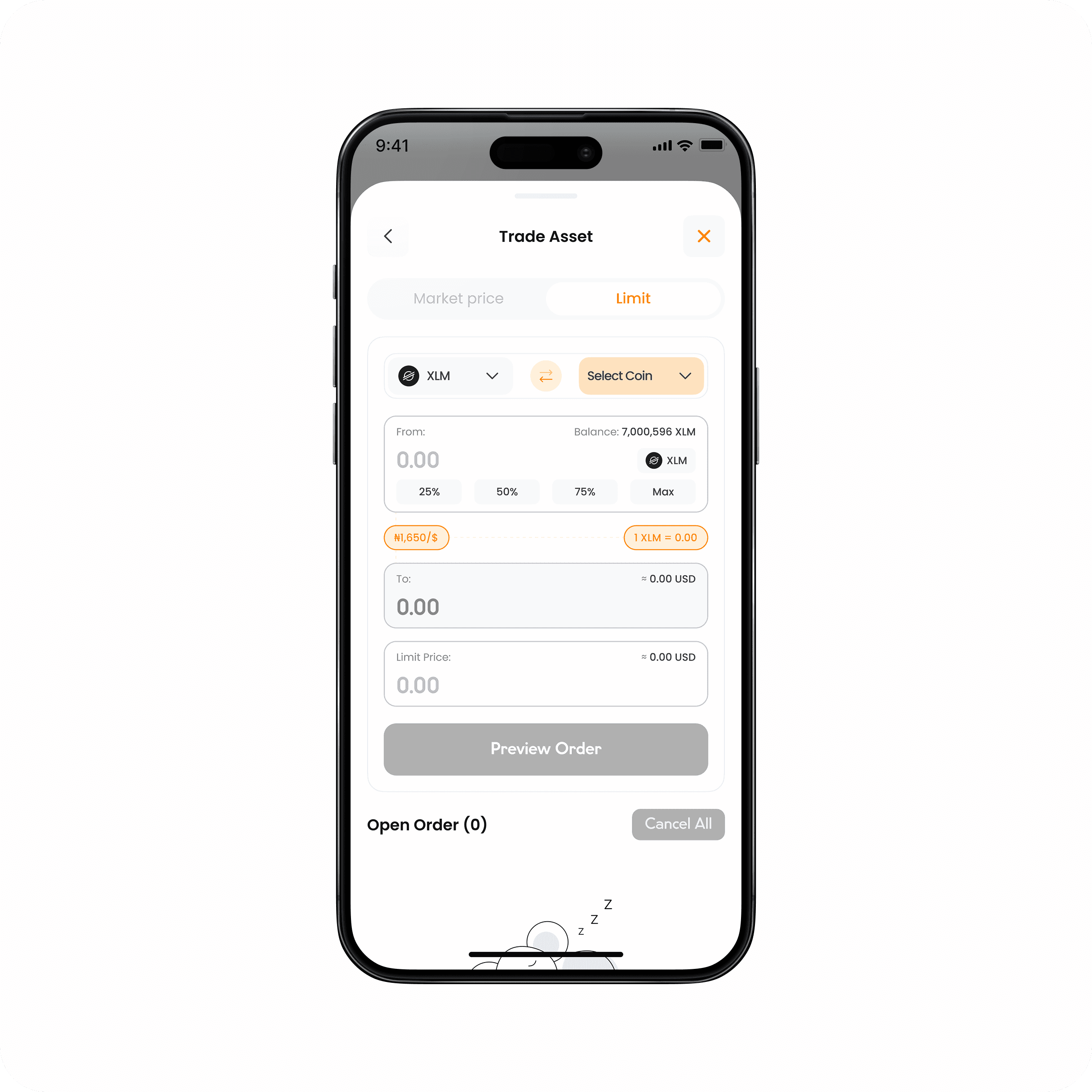
Our user sets the desired price to sell, buy, or swap crypto, and the system will complete the trade once it hits the target.
Apex Pay — bringing Apex to teams and businesses
Even though Apex started as a consumer app, a lot of our power users were actually running businesses or handling money on behalf of a team.
They needed to:
Keep company funds separate from personal wallets
Issue and manage virtual cards for subscriptions and team spend
Track transactions, invoices, and payments in one place
Give teammates access without sharing a single login
That’s where Apex Pay comes in, a version of Apex designed for teams and small businesses.
Instead of rebuilding everything from scratch, we took the core strengths of Apex v3 (wallets, virtual cards, smooth flows) and reframed them around roles, permissions, and clarity at scale.
Designing the Apex Pay overview
On the web, the Overview dashboard is the control room for a business account.
At a glance, a finance lead can:
See the total balance across all company wallets
Jump straight into Deposit, Withdraw, or Trade from the primary actions
Scan My Wallets to understand which assets the business is holding
Review Recent Transactions to see what’s moving in and out
Monitor Virtual Cards, which ones are active, disabled, or terminated, and how much they’re spending
Quick Actions at the top (Cards, Vaults, Team, Settings, Wallet) make it easy to move between day‑to‑day operations (like funding wallets or managing cards) and administration (like managing the team or settings) without hunting through navigation.
Impact & Learnings
We’ve talked about how we redesigned Apex into a true multi‑asset money app.
This is what changed once v3 went live.
Time frame + source
The metrics below come from App Store analytics. The primary comparison is January 2022 vs. August 1, 2023 – Nov 2, 2025.
Growth over time
Total downloads: 138 (Jan 2022) → 151K (Aug 2023–Nov 2025)
Impressions: 2.7K (Jan 2022) → 2.93M (Aug 2023–Nov 2025)
Product page views: 209 (Jan 2022) → 386K (Aug 2023–Nov 2025)
Where growth came from
Most downloads came from:
Nigeria: 77,120
United States: 70,347
Then Ghana (684), Canada (518), and the UK (416).
A note on quality signals (keeping it real)
Conversion rate: 7.08% (Jan 2022) → 7.7% weekly average (Aug 2023–Nov 2025). This is broadly steady, but the dashboard shows a decline vs the comparison period, which points to store page optimisation and message clarity as a clear next lever. Apple defines conversion rate as downloads per impression or per product page view in App Analytics.
Crashes: 0 (Jan 2022) → 14.2K (Aug 2023–Nov 2025, opt in only). This doesn’t directly reflect design quality, but it does affect trust in a money product. It’s one of the reasons reliability, transparency, and safe recovery patterns mattered in the design direction.

Apex moved from “early traction” to being a product people actually trust enough to keep value in, across Nigeria and the US especially.
What I learned
Apex pushed me beyond UI. It forced me into product thinking, systems, and leadership. A few shifts really changed how I design.
Design for how value moves, not just for screens
When we organised around features, the product felt scattered.
When we organised around how money moves, cash → crypto → gift card → fiat → virtual card, everything clicked.
Navigation became flows. Wallets became the backbone. Patterns became reusable across the entire system.
Simplicity is brutal when everything is a power feature
Buy. Sell. Swap. Withdraw. Set limits. The challenge wasn’t adding capability. It was making it usable for beginners and fast for pros, without splitting the product in two. That led to progressive disclosure, strong defaults, and consistent confirmation patterns. Simplicity isn’t less power. It’s staged power.
Trust is a product feature, not just a setting
Trust isn’t something you design once in settings. It runs through everything.
We built:
Login & security systems
Device history
Anti-phishing codes
Transparent transaction states
But more importantly, we focused on how the product communicates risk. Clear confirmations. Honest failure states. Reversible actions where possible.
Working closely with support made this real. Small UI decisions directly affected disputes, tickets, and user confidence.
Leading juniors change how you design
Moving from solo contributor to leading two junior designers forced me to:
Make my thinking explicit (not just “feel” the right solution)
Create a system they could build on, not just one‑off screens
Balance quality with delivery speed for a growing product
It made me better at:
Breaking work into clear problems and flows
Giving feedback that’s specific and actionable
Protecting the product direction while letting other designers grow
What I’d do next with more time
If I were pushing this forward, I’d start by going deeper on segmentation in onboarding, shaping the first-time experience around intent. A crypto-first user doesn’t think the same way as a gift card trader. And someone who just wants a virtual card for online spend shouldn’t have to wade through trading language to get there.
Apex Pay would need a proper second wind too. Sharper roles and permissions, stronger team-level reporting and tighter controls. Move it from “promising beta” into something that genuinely feels like a business-ready product.
And underneath all of it, reliability and clarity at scale. Using analytics not just to chase growth, but to surface friction in the flows that matter, failed trades, abandoned withdrawals, incomplete KYC. Because that’s where trust quietly breaks.
Read Case Studies

